First Data & Next Steps
Your Smart Meter is connected — what happens now? Here is what to expect in terms of when the first data arrives and what you can do with it.
When Will the First Data Arrive?
Energy data is delivered with a one-day delay (T-1). This means: today you see yesterday's data. First data arrives within hours to days after a successful connection.
What You See in the App
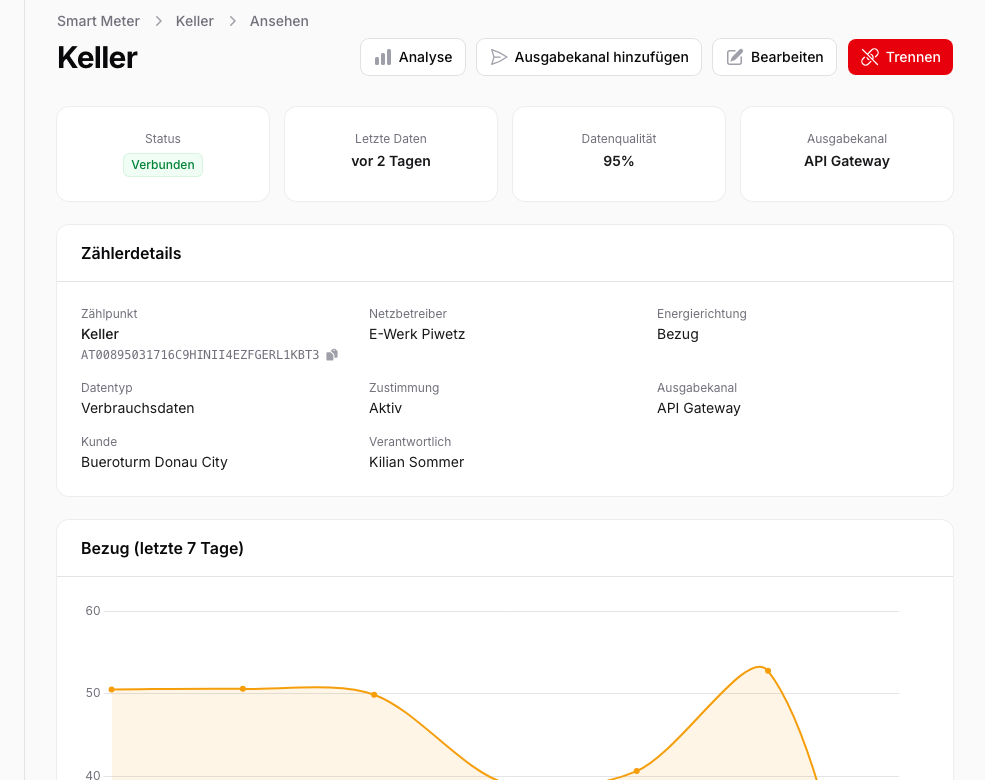
On the Smart Meter detail page you will find:
- Consumption chart: Your daily consumption over the last 30 days as a bar chart. Finer resolutions are available under Energy Analysis → Consumption via the "Time interval" selector.
- Latest data: When the most recent readings were received.
- Data quality: The share of measured values (compared to estimated or substituted values).
Next Steps
Complete Your Building Profile
Add information about your building (building type, floor area, building year) so you can compare your consumption against the Austrian average. Building profile and benchmarking are part of Advanced Analysis: included in the Plus plan, bookable as an add-on on Light.
Set up an integration
If you want to use your data in an external system — such as an energy management system, building automation, or your own dashboard — set up an integration. Click "Add integration" on the Smart Meter detail page.
Available output formats:
- Webhook: JSON payload sent to a URL of your choice as soon as new data arrives
- CSV by email: Scheduled CSV reports delivered directly to your inbox (daily, weekly, or monthly)
- MQTT: Published to an MQTT broker as soon as new data arrives
- SFTP: Files delivered to an SFTP server of your choice
